
An AI photo enhancer is often described as a quick way to improve image quality. That description is partly true, but it misses the bigger picture. These tools can be helpful, but they also have clear limits. Understanding what they actually do makes a big difference in the results you get.
This guide explains how an AI photo enhancer works, what it can realistically improve, and when it’s worth using. It’s written for people who want better photos without unrealistic expectations.
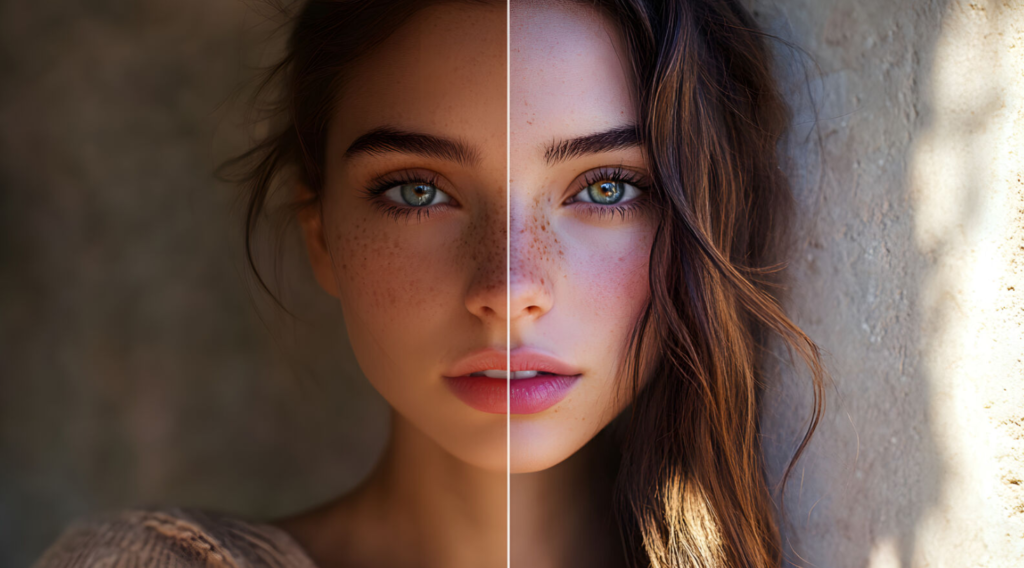
What Is an AI Photo Enhancer?
An AI photo enhancer is a tool that uses machine learning to improve the visual quality of an image. Instead of applying simple filters, it analyses the photo and adjusts details like sharpness, contrast, and clarity based on learned patterns.
Basic photo editing tools rely on fixed rules. An AI photo enhancer works differently. It compares parts of your image to patterns it has seen during training. From that comparison, it decides how edges, textures, and colours *should* look.
People use these tools to enhance photo quality when the original image feels flat, slightly blurry, or low in detail. They’re especially common for older photos, mobile pictures, and images pulled from compressed sources.
How AI Photo Enhancers Work in Real Use
In real-world use, AI photo enhancers focus on a few core ideas.
First is pattern recognition. The tool looks for familiar shapes, such as faces, text, or object edges. It tries to identify where details are missing or unclear.
Next comes edge and detail prediction. The software estimates what clean edges might look like based on similar images it has processed before. This is why results can vary. The tool is predicting, not recovering lost data.
Finally, there’s texture and clarity enhancement. Fine details are adjusted to make the image feel sharper and more balanced. This is where improvements often feel noticeable, but also where over-processing can happen.
This usually works best when the original photo still has some detail to work with.
What an AI Photo Enhancer Can Improve
AI photo enhancers are most effective at subtle improvements.
**Sharpness**
Edges can look clearer, especially in slightly soft images. This helps when photos feel dull but not severely out of focus.
**Clarity**
Overall image definition often improves. Small textures become easier to see without heavy manual editing.
**Noise reduction**
Grain from low-light photos can be softened. This tends to work better on backgrounds than on fine details.
**Minor blur correction**
Some tools can help fix blurry photos caused by slight motion or focus issues. Heavy blur remains difficult.
**Color balance**
Colors may appear more even and natural after enhancement.
Most people see the best results when they keep adjustments modest.
Where AI Photo Enhancers Struggle
These tools have limits, and ignoring them leads to disappointment.
Over-sharpening is common. Images can look crisp at first, then artificial once you zoom in. Skin textures are especially sensitive.
Artificial textures can appear when the AI guesses wrong. Hair, fabric, and fine patterns sometimes look unnatural.
Very blurry or very small images don’t give the AI enough information. Improvements in these cases are minimal.
Inconsistent results also happen. Two similar photos may produce different outcomes.
Being aware of these issues helps you judge results more fairly.
AI Photo Enhancer vs Traditional Photo Editing
Traditional photo editing relies on manual control. You adjust sliders and tools directly. This gives precision, but it takes time and experience.
An AI photo enhancer automates many of those decisions. It can improve image clarity faster, especially for beginners.
Traditional sharpening often increases contrast around edges, which can introduce halos. AI enhancement usually feels smoother, but less predictable.
Manual editing still makes sense when accuracy matters. AI tools work better for quick improvements and batch processing.
Free vs Paid AI Photo Enhancers (High-Level)
Free photo enhancer tools are often enough for casual use. They work well for testing ideas or improving personal images.
The trade-off is usually resolution limits, slower processing, or fewer controls. Some also restrict downloads.
Paid tools offer higher output quality and more consistency. They make sense for frequent use or professional workflows.
Many users start free and upgrade only when limits become noticeable.
Common Mistakes People Make When Using AI Photo Enhancers
A few patterns show up again and again.
Expecting perfect results leads to frustration. AI photo editing tools improve images, not replace photography skills.
Over-processing can make photos look unnatural. Subtle changes usually look better.
Ignoring realism is another issue. Just because the tool allows heavy enhancement doesn’t mean it should be used.
Using poor source images also limits results. The better the original photo, the better the outcome.
How to Choose the Right AI Photo Enhancer
Choosing the right tool depends on your needs.
**Based on image type**
– Faces need gentle handling
– Product images benefit from clean edges
– Landscapes tolerate stronger enhancement
**Based on intended use**
– Social media allows more flexibility
– Print and ecommerce require realism
**Based on quality expectations**
– Light improvement vs dramatic change
**Based on usage frequency**
– Occasional use favors simplicity
– Regular use benefits from control
Testing a few options is usually more helpful than reading feature lists.
Final Thoughts
An AI photo enhancer can be a practical part of modern image workflows. It helps enhance photo quality, save time, and improve consistency.
These tools aren’t magic. They work best when expectations are realistic, and adjustments stay subtle.
Testing different settings and reviewing results carefully matter more than promises. Used thoughtfully, AI photo enhancers become useful helpers rather than shortcuts that disappoint.