An AI image upscaler is often the first tool people discover when they want to improve image quality. Maybe an old photo looks too small. Maybe a product image feels soft on a website. Or maybe a social media post just doesn’t look sharp enough.
AI image upscalers promise a simple idea: take a low-resolution image and make it look clearer and larger. Sometimes they do this well. Other times, the results feel slightly off. Understanding what these tools actually do helps set realistic expectations.
This guide explains how an AI image upscaler works, when it helps, and where it falls short, based on practical use rather than marketing claims.
What Is an AI Image Upscaler?
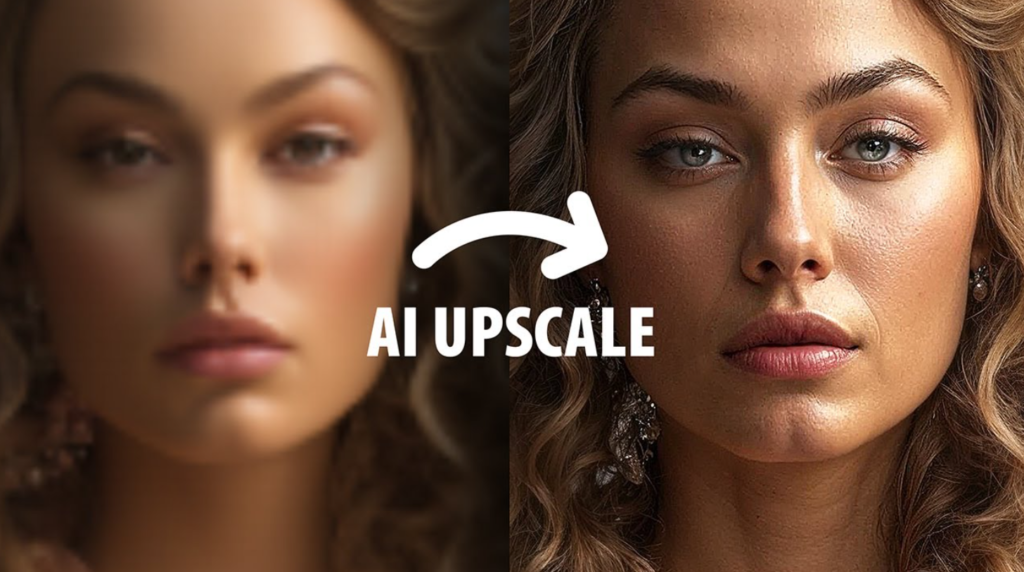
An AI image upscaler is a tool designed to increase the size of an image while trying to preserve or improve its visual quality.
Traditional resizing tools simply stretch pixels. That usually leads to blurry edges and soft details. AI image upscalers work differently. Instead of stretching what’s already there, they analyze the image and predict what missing details *might* look like.
People use AI image upscaler tools for several reasons:
– Making small images usable on larger screens
– Improving product photos for ecommerce
– Preparing images for websites or blogs
– Enhancing visuals for social media
At its core, an AI image upscaler is not restoring lost detail. It’s estimating detail based on patterns it has learned.
How AI Image Upscalers Work in Practice
AI image upscaling relies on pattern recognition. During training, the system studies large numbers of images at different resolutions. Over time, it learns how edges, textures, and shapes usually appear.
When you upload an image, the AI scans it for areas that look incomplete or low-resolution. It then predicts what those areas should look like if the image were larger. This includes:
– Smoothing jagged edges
– Adding texture where detail is missing
– Adjusting contrast to improve clarity
For example, when you use an AI upscale image tool on a small product photo, the edges of the product often look cleaner than with basic resizing. Fine textures may appear sharper. At the same time, the AI is guessing. That guess is sometimes accurate, sometimes not.
This explains why results vary from image to image.
AI Image Upscaler vs Traditional Image Resizing
Traditional image resizing increases dimensions by spreading existing pixels over a larger area. The result is predictable but often disappointing. Images look soft, and details fade quickly.
AI image upscaling takes a different approach:
– **Traditional resizing:** stretches pixels, no new detail
– **AI image upscaling:** predicts and fills in missing detail
The difference becomes obvious when scaling images more than slightly. Traditional resizing struggles early. AI-based image upscaler tools tend to maintain cleaner edges and better visual balance, especially at moderate enlargement levels.
That said, AI doesn’t create true detail. It creates *believable* detail. That distinction matters.
When an AI Image Upscaler Works Best
AI image upscalers tend to perform best under certain conditions.
They usually work well when:
– The original image has some visible detail
– Lighting is reasonably even
– The image isn’t extremely small to begin with
Common situations where results are useful include:
– **Product photos:** Clean backgrounds and clear shapes upscale well
– **Website images:** Moderate upscaling improves sharpness on larger displays
– **Social media visuals:** Slight enhancement helps images stand out
This usually works best when the original image is “okay” rather than poor. If an image already looks extremely blurry or pixelated, the AI has little to work with.
Limitations of AI Image Upscalers
AI image upscalers are helpful, but they have clear limits.
One issue is artificial texture. Sometimes skin looks too smooth. Other times, surfaces appear slightly plastic. This happens because the AI is inventing detail rather than restoring it.
Over-sharpening is another common problem. Many tools default to aggressive enhancement. At first glance, the image looks crisp. On closer inspection, edges may look unnatural.
Inconsistent results are also common. Two similar images can produce very different outcomes depending on lighting, subject matter, and resolution.
Most importantly, AI image upscaling does not recover original detail. It creates an approximation. For accuracy-sensitive work, that matters.
Free vs Paid AI Image Upscaler Tools (High-Level)
A free image upscaler can be useful for basic tasks. Many free tools allow limited upscaling and simple improvements. They’re often enough for casual use or testing.
However, free tools usually come with trade-offs:
– Resolution limits
– Slower processing
– Watermarks or download restrictions
Paid tools often provide more control and higher output limits. They’re better suited for frequent use, ecommerce workflows, or professional projects.
For many users, starting with a free image upscaler makes sense. Paying becomes worthwhile once limitations interfere with real work.
Common Mistakes People Make When Using an AI Image Upscaler
Several mistakes show up again and again.
One is expecting miracles. An AI image upscaler cannot turn a tiny, blurry photo into a high-end image.
Another is over-processing. Increasing sharpness too much introduces halos and artificial edges.
Upscaling extremely small images is also risky. If the original image lacks structure, the AI has nothing reliable to predict.
Ignoring realism is another issue. Sometimes a slightly softer image looks more natural than an aggressively enhanced one.
How to Choose the Right AI Image Upscaler for Your Needs
Choosing the right tool depends on how you plan to use it.
Consider the following:
– **Image type:** Product images and graphics upscale better than complex scenes
– **Intended use:** Web images need less upscaling than print assets
– **Output size:** Larger targets require more careful enhancement
– **Usage frequency:** Occasional use favors simpler tools
Testing a few options with your own images often reveals more than feature lists.
Final Thoughts
An AI image upscaler is best seen as a support tool, not a fix-all solution. It can improve image clarity, make visuals more usable, and save time. It cannot recreate lost detail or guarantee perfect results.
Subtle adjustments usually look better than aggressive ones. Free tools are fine for light use. Paid tools make sense when consistency matters.
The most reliable results come from experimenting with realistic expectations. When used thoughtfully, AI image upscaling becomes a practical part of modern image workflows rather than a source of disappointment.